
Whentomeet: A Simple Way to Find the Best Meeting Time
Finding a meeting time that suits everyone can often become a challenge, especially when people have different schedules, locations, and responsibilities. Whether planning a business discussion, study session, or community event, coordinating availability can take longer than expected. Whentomeet offers a simple solution by helping groups compare schedules and quickly identify the best time to meet.
Understanding Whentomeet
Whentomeet is an online scheduling tool designed to make meeting coordination easier for groups of all sizes. Instead of exchanging multiple emails or messages, users can create an event and allow participants to mark their available time slots. The platform then displays everyone’s availability in a shared visual format, making scheduling decisions much simpler.
Why People Choose Whentomeet
Many people prefer Whentomeet because it focuses on simplicity rather than overwhelming users with complicated features. Students, freelancers, remote workers, and community groups appreciate how quickly they can create events and gather responses. Its straightforward design helps users spend less time organizing schedules and more time focusing on their actual meetings.
Creating a Whentomeet Event
Setting up an event on Whentomeet requires only a few simple steps. Users enter an event name, select the preferred dates and times, and generate a shareable link for participants. This quick setup process allows organizers to begin collecting availability immediately without requiring lengthy registrations or account creation.
How the Availability Grid Works
The availability grid is one of Whentomeet’s most useful features because it provides a visual representation of participant schedules. Users simply click and drag across the times they are available, and the grid updates accordingly. As more people respond, overlapping availability becomes easy to spot, helping organizers choose the most suitable meeting time.
Core Features of Whentomeet
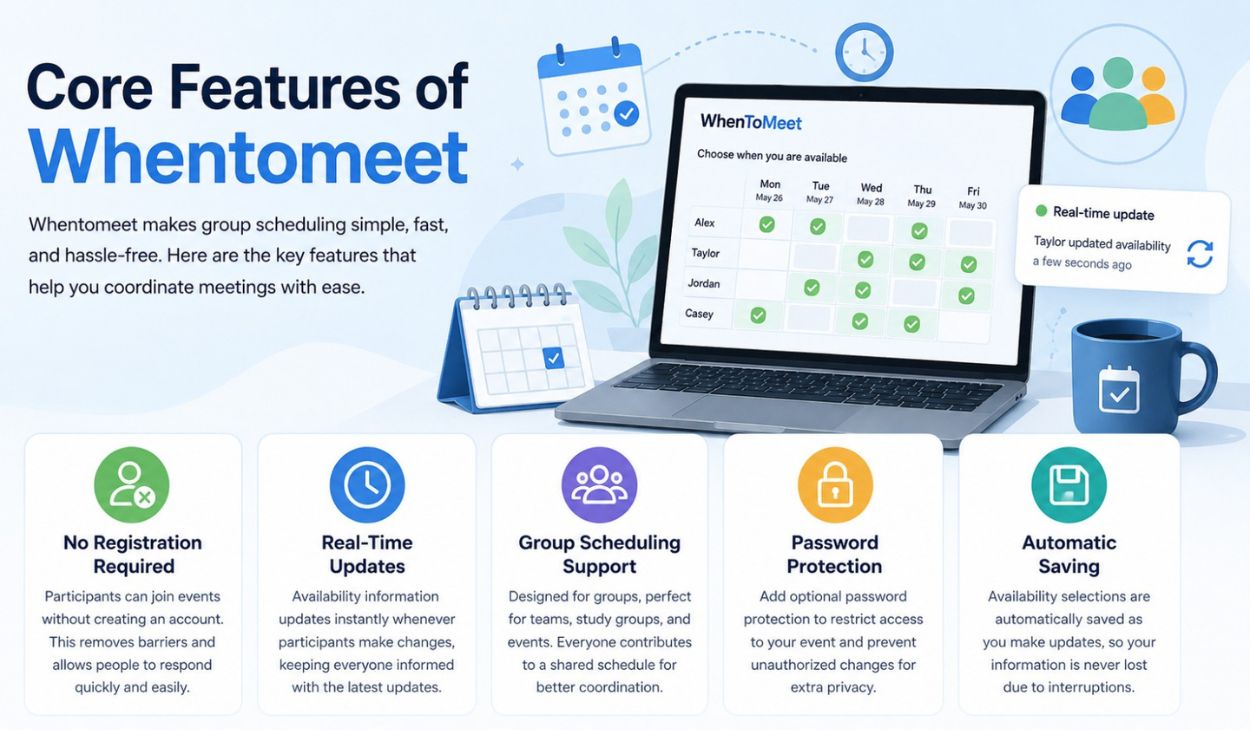
Whentomeet includes several practical features that make scheduling efficient while maintaining a simple user experience. These tools help users coordinate meetings without unnecessary complexity.
No Registration Required
One of the biggest advantages of Whentomeet is that participants can join events without creating an account. This removes barriers to participation and allows people to respond quickly. As a result, organizers often receive faster responses and better engagement from invited participants.
Real-Time Updates
The platform updates availability information instantly whenever participants make changes. This real-time functionality helps everyone stay informed about the latest schedule preferences. Organizers can monitor responses as they arrive and make decisions with up-to-date information.
Group Scheduling Support
Whentomeet is designed specifically for coordinating groups, making it ideal for team meetings, study groups, and community events. Multiple participants can contribute their availability to a shared schedule. This collaborative approach reduces confusion and improves overall scheduling efficiency.
Password Protection
For users who want additional privacy, Whentomeet offers optional password protection. Organizers can restrict access to event information and prevent unauthorized changes. This feature adds an extra layer of security while maintaining the platform’s ease of use.
Automatic Saving
Availability selections are automatically saved as participants make updates. This ensures that information is not lost due to accidental page refreshes or interruptions. Automatic saving provides convenience and reduces the risk of scheduling errors.
Benefits of Using Whentomeet
Whentomeet offers several benefits that make scheduling easier and more organized. Its user-friendly design encourages participation while reducing the time spent coordinating calendars. By centralizing availability information, the platform helps users make faster and more informed scheduling decisions.
Whentomeet for Students
Students often use Whentomeet to organize group projects, study sessions, and academic discussions. Coordinating schedules among classmates can be difficult, especially during busy semesters. The platform provides a convenient way to identify common availability and simplify planning.
Whentomeet for Freelancers and Professionals
Freelancers and independent professionals frequently work with clients and partners who have different schedules. Whentomeet helps streamline appointment planning by displaying availability in a clear visual format. This allows professionals to spend less time scheduling and more time focusing on productive work.
Supporting Remote Teams with Time Zone Management
Remote teams often face scheduling challenges because members may work in different countries and time zones. Whentomeet includes time zone support that helps participants compare availability more accurately. This feature improves communication and makes international meeting coordination more manageable.
Privacy and Security Considerations

Privacy is an important factor whenever users share scheduling information online. Whentomeet minimizes concerns by requiring limited personal information and offering optional security features. This balanced approach allows users to coordinate meetings comfortably while maintaining control over event access.
Common Limitations of Whentomeet
Although Whentomeet performs its core function effectively, it does have some limitations. The platform lacks direct calendar integrations, automated reminders, and advanced workflow automation features found in some modern scheduling tools. However, many users consider these trade-offs acceptable because of the platform’s simplicity and ease of use.
Comparing Whentomeet with Other Scheduling Tools
Whentomeet is often compared with other scheduling platforms because users have different preferences and requirements. While some tools prioritize advanced integrations and automation, Whentomeet focuses on quick setup and straightforward availability tracking. This difference makes it attractive to users seeking a lightweight scheduling solution.
Whentomeet vs Doodle
Doodle offers additional features such as reminders and calendar integrations, while Whentomeet focuses on simplicity and visual scheduling. Users who prefer a fast and uncomplicated experience often choose Whentomeet. Those needing more automation may find Doodle better suited to their needs.
Whentomeet vs WhenIsGood
Both platforms help groups compare availability, but they differ slightly in interface design and functionality. Whentomeet provides a highly visual availability grid that many users find intuitive. WhenIsGood offers a similar concept while emphasizing alternative scheduling workflows.
Whentomeet vs Calday
Calday includes more modern scheduling tools and calendar management options. Whentomeet, on the other hand, prioritizes quick participation without requiring extensive setup. The choice often depends on whether users value simplicity or advanced scheduling capabilities.
Popular Alternatives to Whentomeet
Several alternatives exist for users who need different scheduling features or integrations. Popular options include Doodle, WhenIsGood, and Calday, each offering unique strengths. Exploring these alternatives can help users find the scheduling platform that best matches their specific requirements.
How Whentomeet Enhances Collaboration
Effective scheduling plays a significant role in successful collaboration. By making availability visible to all participants, Whentomeet reduces misunderstandings and scheduling conflicts. This streamlined coordination process allows teams and groups to focus on meaningful discussions rather than logistical challenges.
Best Practices for Effective Scheduling
Successful scheduling often depends on clear communication and timely responses from participants. Organizers should provide accurate date ranges, encourage prompt availability updates, and review responses regularly. Following these simple practices helps ensure smoother coordination and better meeting outcomes.
Future of Simple Scheduling Platforms
As remote work and digital collaboration continue to grow, simple scheduling platforms are likely to remain valuable. Users increasingly appreciate tools that reduce complexity while delivering practical functionality. Whentomeet demonstrates how straightforward design can continue meeting the needs of modern teams and communities.
Final Thoughts
Whentomeet remains a reliable option for anyone seeking a quick and uncomplicated way to coordinate meetings. Its visual availability grid, easy event creation process, and accessibility make it useful for students, professionals, and community groups alike. While it may lack some advanced features, its simplicity continues to be one of its greatest strengths.
FAQs about Whentomeet
1. What is Whentomeet?
Whentomeet is an online scheduling tool that helps groups find a suitable meeting time by comparing availability.
2. Is Whentomeet free to use?
Yes, Whentomeet is completely free for creating and managing scheduling events.
3. Does Whentomeet require an account?
No, participants can join and respond without creating an account.
4. Can Whentomeet handle different time zones?
Yes, the platform includes time zone support for scheduling across multiple locations.
5. Does Whentomeet integrate with Google Calendar?
No, Whentomeet does not currently provide direct Google Calendar integration.
6. How secure is Whentomeet?
Whentomeet offers optional password protection and requires minimal personal information.
7. What are the best alternatives to Whentomeet?
Popular alternatives include Doodle, WhenIsGood, and Calday.
