

Meeting Scheduling Tool: Save Time and Stay Productive
A meeting scheduling tool has become an essential part of modern professional life. Whether you are a freelancer, business owner, consultant, or member of a remote team, organizing meetings efficiently can significantly impact productivity. Traditional scheduling methods often involve long email chains, repeated follow-ups, and constant calendar checking, all of which consume valuable time. Modern scheduling platforms eliminate these challenges by automating appointment booking and simplifying coordination. As workplaces become increasingly digital and globally connected, scheduling tools help professionals stay organized, reduce stress, and focus on meaningful work rather than administrative tasks.
Why Modern Meeting Scheduling Feels Different
Scheduling meetings today is dramatically different from the way it was handled just a few years ago. Digital scheduling platforms allow users to share their availability instantly, making it easier for participants to select suitable meeting times without extensive communication. Instead of spending hours exchanging messages to find a convenient slot, appointments can be arranged within minutes. This shift has improved efficiency across industries and created a smoother experience for both organizers and attendees. The convenience offered by scheduling tools reflects how technology continues to streamline everyday business operations.
The Hidden Cost of Manual Scheduling
Many professionals underestimate how much time is lost through manual scheduling. Constantly reviewing calendars, responding to emails, and coordinating availability can interrupt workflow and reduce productivity. These seemingly small tasks add up quickly, consuming hours that could be spent on strategic planning, client work, or project development. Manual scheduling also increases the risk of misunderstandings and missed appointments. By replacing repetitive coordination tasks with automation, scheduling tools help businesses recover valuable time and improve operational efficiency.
Benefits of Real-Time Availability and Booking Links
Real-time availability is one of the most valuable features of modern scheduling software. Participants can instantly view open time slots and choose a meeting time that fits their schedule without waiting for confirmation. Booking links remove the need for lengthy back-and-forth conversations and make appointment scheduling more transparent. This streamlined process benefits both organizers and attendees by reducing delays and simplifying decision-making. The result is a faster, more convenient scheduling experience that supports stronger professional relationships.
Reducing Schedule Conflicts and Improving Collaboration
Scheduling conflicts can disrupt projects, delay decisions, and create unnecessary frustration among team members. Meeting scheduling tools help prevent these issues by keeping calendars updated and synchronized across platforms. Shared visibility into availability allows teams to coordinate more effectively and avoid double bookings. Improved scheduling accuracy supports smoother collaboration and helps organizations maintain momentum on important initiatives. When everyone has access to accurate scheduling information, communication becomes more efficient and teamwork improves naturally.
What Makes a Good Meeting Scheduling Tool
An effective meeting scheduling tool combines ease of use with powerful functionality. The best platforms provide intuitive interfaces that allow users to create appointments, manage availability, and customize booking options without technical complexity. Flexibility is equally important because different organizations have unique scheduling needs. Reliable scheduling solutions should integrate seamlessly with existing workflows while minimizing administrative effort. Choosing the right platform can significantly improve productivity and support long-term organizational growth.
Ease of Use and User-Friendly Design
User experience plays a critical role in the success of any scheduling platform. A clean interface and simple navigation make it easier for both organizers and participants to schedule meetings quickly. When users can understand and operate a tool without extensive training, adoption rates increase significantly. A user-friendly design also reduces errors and improves overall satisfaction. Organizations that prioritize simplicity often experience smoother implementation and greater efficiency across teams.
Key Features of an Effective Scheduling Tool
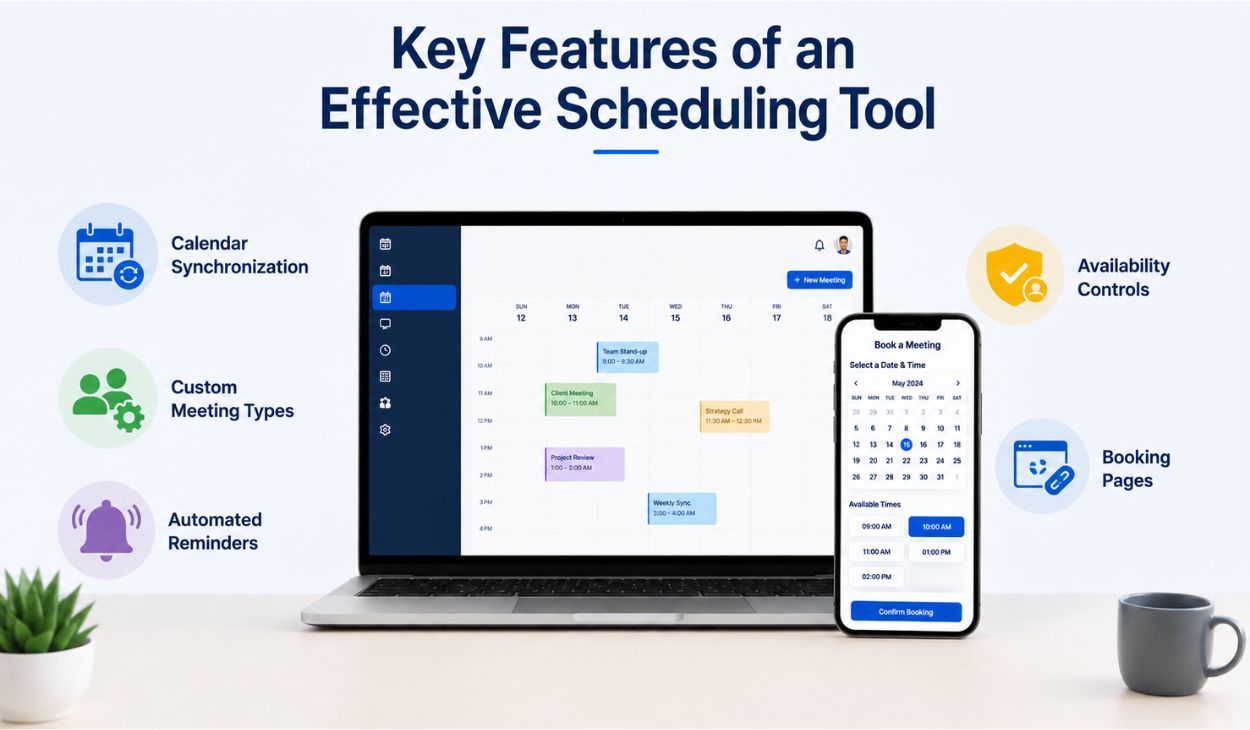
Several important features contribute to a successful scheduling experience:
- Calendar Synchronization: Automatically updates appointments across connected calendars.
- Custom Meeting Types: Supports various appointment durations and formats.
- Automated Reminders: Helps reduce missed meetings and no-shows.
- Availability Controls: Prevents scheduling conflicts and overlapping bookings.
- Booking Pages: Allows participants to schedule independently.
These capabilities work together to simplify appointment management and create a more efficient workflow for both individuals and organizations.
Calendar Synchronization and Availability Settings
Calendar synchronization ensures that scheduling information remains accurate across multiple platforms and devices. When changes occur in one calendar, updates are reflected automatically elsewhere, reducing confusion and preventing conflicts. Availability settings provide additional control by allowing users to define working hours, break periods, and preferred meeting windows. Together, these features create a reliable scheduling environment that helps professionals stay organized. Accurate scheduling data supports better planning and minimizes disruptions.
Scalability and Customer Support
As organizations grow, their scheduling requirements often become more complex. A scalable scheduling solution can accommodate increasing numbers of users, appointments, and workflows without sacrificing performance. Strong customer support is equally important because users occasionally need assistance with integrations, customization, or troubleshooting. Reliable support services help organizations maximize the value of their scheduling platform. Businesses that invest in scalable and well-supported solutions are better prepared for future growth.
Popular Meeting Scheduling Platforms and Their Strengths
Many scheduling platforms serve different business needs and user preferences. Solutions such as Calendly, Doodle, Picktime, SimplyBook.me, and Acuity Scheduling offer a variety of features ranging from simple appointment booking to advanced business management tools. Some platforms focus on individual professionals, while others support large teams and enterprise environments. Evaluating features, integrations, and pricing helps organizations identify the most suitable option. The right platform depends on operational goals and workflow complexity.
Simple vs. Enterprise Scheduling Solutions
Simple scheduling tools are often ideal for freelancers, consultants, and small businesses that require basic appointment management. They provide essential functionality without unnecessary complexity, making them easy to implement and use. Enterprise scheduling solutions, on the other hand, offer advanced capabilities such as analytics, team coordination, CRM integrations, and workflow automation. Larger organizations benefit from these sophisticated features because they support more complex operations. Selecting the appropriate solution requires a clear understanding of organizational needs and growth objectives.
AI-Powered Scheduling and Collaboration Features
Artificial intelligence is transforming the scheduling landscape by automating tasks that previously required manual effort. AI-powered tools can analyze availability patterns, recommend optimal meeting times, and reduce scheduling conflicts automatically. These intelligent features save time while improving scheduling accuracy. Collaboration also becomes easier because AI helps coordinate multiple participants efficiently. As technology continues to evolve, AI-driven scheduling solutions are expected to play an increasingly important role in workplace productivity.
Calendar and Video Meeting Integrations
Modern scheduling platforms integrate seamlessly with widely used tools such as Google Calendar, Outlook, Zoom, Microsoft Teams, and Google Meet. These integrations ensure that meeting information remains synchronized across systems and that virtual meeting links are generated automatically. Users no longer need to switch between multiple applications to manage appointments. This connected ecosystem improves efficiency and creates a more streamlined experience. Integration capabilities have become a key factor when selecting a scheduling platform.
How Automation Improves Productivity
Automation removes repetitive administrative tasks that often consume valuable time throughout the workday. Scheduling platforms can automatically handle bookings, confirmations, reminders, and calendar updates without requiring constant supervision. This reduces administrative workloads and allows professionals to focus on high-value activities. Productivity improves because less energy is spent managing logistics and more attention can be directed toward strategic goals. Automation transforms scheduling from a time-consuming responsibility into a seamless background process.
Automated Booking and Reminder Systems
Automated booking systems allow participants to schedule appointments independently based on available time slots. Once a meeting is booked, reminder notifications are sent automatically through email or text messages. These reminders reduce no-shows and help participants stay informed about upcoming appointments. The entire process operates efficiently without requiring manual intervention from organizers. Businesses benefit from improved attendance rates and a more organized scheduling environment.
Managing Recurring Meetings
Recurring meetings are common in many organizations but can become difficult to manage manually. Scheduling tools simplify this process by automatically creating repeating appointments according to predefined schedules. Changes made to recurring meetings can be updated consistently across calendars, ensuring accuracy and reducing confusion. This automation saves considerable time while maintaining organization. Teams can focus on the purpose of their meetings rather than the administrative effort required to schedule them.
Payment Integration and Online Transactions
Many scheduling platforms support payment collection during the booking process. This functionality is particularly useful for consultants, coaches, trainers, and service providers who charge for appointments. Clients can book and pay in a single transaction, creating a more convenient experience for everyone involved. Automated payment processing also reduces administrative tasks associated with invoicing and collections. By combining scheduling and payments, businesses can streamline operations and improve customer satisfaction.
Analytics and Reporting Capabilities
Analytics features provide valuable insights into appointment trends, customer behavior, and scheduling efficiency. Organizations can track booking volumes, attendance rates, and resource utilization to identify opportunities for improvement. Data-driven decision-making enables businesses to optimize workflows and enhance productivity. Reporting tools also help managers evaluate performance and plan future strategies more effectively. Access to meaningful scheduling data creates a competitive advantage in today’s fast-paced business environment.
Supporting Teams Across Different Locations
Global teams require scheduling solutions that accommodate participants across multiple regions and time zones. Without appropriate tools, coordinating international meetings can become confusing and inefficient. Modern scheduling platforms simplify this process by providing centralized availability management and automated adjustments. Team members can collaborate more effectively regardless of geographic location. These capabilities have become increasingly important as remote and hybrid work models continue to expand worldwide.
Automatic Time Zone Adjustments
Time zone differences are one of the biggest challenges in international collaboration. Scheduling tools automatically detect participant locations and display meeting times according to local time zones. This eliminates the need for manual calculations and reduces the risk of misunderstandings. Accurate time zone management improves attendance and ensures smoother communication. Professionals can schedule global meetings confidently without worrying about conversion errors.
Scheduling for Remote and International Teams
Remote work has transformed the way organizations operate and collaborate. Distributed teams often span multiple countries, making effective scheduling more important than ever. Shared availability, automatic updates, and time zone adjustments help remote employees coordinate efficiently. These features reduce scheduling friction and improve overall teamwork. Strong scheduling practices enable remote organizations to maintain productivity while supporting flexible work arrangements.
Shared Calendars and Availability Management
Shared calendars provide transparency into team availability without exposing sensitive personal information. Employees can quickly identify suitable meeting times and coordinate schedules with minimal communication. Availability management tools further enhance efficiency by allowing users to establish clear scheduling preferences. These capabilities reduce delays and support better planning. Organizations benefit from improved coordination and a more structured workflow.
Improving Team Collaboration
Effective scheduling creates a foundation for stronger collaboration across departments and teams. When employees spend less time coordinating availability, they can dedicate more attention to project goals and meaningful discussions. Organized schedules reduce misunderstandings and improve communication quality. Teams become more responsive and productive because logistical obstacles are minimized. Better scheduling ultimately supports stronger organizational performance.
Privacy and Security Matter
Privacy and security are essential considerations when sharing scheduling information online. Users need confidence that their calendar data and appointment details remain protected from unauthorized access. Reputable scheduling platforms implement safeguards designed to secure sensitive information. These protections help maintain trust among clients, colleagues, and business partners. Strong security practices are fundamental to a positive scheduling experience.
Protecting Calendar Information
Most scheduling tools protect privacy by displaying only available time slots rather than detailed calendar events. This approach allows participants to schedule meetings efficiently while keeping personal information confidential. Users maintain control over what others can see without sacrificing convenience. Protecting calendar information helps prevent accidental disclosure of sensitive data. Privacy-focused design contributes to greater confidence in scheduling technology.
Privacy Settings and Secure Scheduling Practices
Advanced privacy settings provide users with greater control over how scheduling information is shared. Organizations can establish permissions, manage visibility levels, and implement security protocols that align with their needs. Regular reviews of privacy configurations help maintain strong protection as requirements evolve. Secure scheduling practices reduce risks and support compliance with data protection standards. Responsible information management strengthens professional credibility.
Building Trust Through Secure Availability Sharing
Trust is a critical component of successful professional relationships. When clients and colleagues know that their information is handled securely, they are more comfortable engaging with scheduling systems. Secure availability sharing demonstrates professionalism and respect for privacy. This confidence encourages smoother communication and stronger long-term partnerships. Reliable scheduling platforms help organizations build trust while maintaining operational efficiency.
Group Meetings Become Easier
Coordinating meetings involving multiple participants can be challenging when availability varies significantly. Scheduling tools simplify this process by consolidating scheduling information into a single platform. Participants can quickly identify common availability and select suitable meeting times without extensive discussion. This reduces administrative effort and improves efficiency. Group scheduling becomes more manageable, even for large or geographically distributed teams.
Challenges of Coordinating Multiple Participants
Traditional group scheduling often involves numerous emails, conflicting preferences, and frequent schedule changes. These challenges can delay important decisions and create frustration among participants. Scheduling platforms address these issues by organizing availability information centrally and automatically. The result is a more efficient and transparent scheduling process. Teams can focus on meeting objectives rather than coordination difficulties.
Availability Polls and Collective Scheduling
Availability polls provide an effective way to gather scheduling preferences from multiple participants. Users simply indicate their preferred time slots, and the platform identifies the most suitable options automatically. This method eliminates much of the guesswork associated with group scheduling. Collective decision-making becomes faster and more organized. Availability polling is particularly valuable for large teams and collaborative projects.
Organizer Controls and Schedule Optimization
Advanced organizer controls allow meeting coordinators to manage appointments more effectively. Features such as scheduling rules, participant limits, and optimization tools help identify the most appropriate meeting times. These controls provide flexibility while reducing conflicts and inefficiencies. Better organization leads to more productive meetings and improved participant experiences. Effective scheduling management supports stronger outcomes across teams and organizations.
Benefits for Teams and Organizations
Efficient scheduling delivers benefits that extend far beyond appointment management. Organizations experience stronger communication, better resource allocation, and improved productivity when scheduling processes operate smoothly. Employees spend less time coordinating logistics and more time completing meaningful work. Improved efficiency contributes to higher performance and greater job satisfaction. Scheduling tools serve as valuable assets for modern organizations.
Personalized Scheduling and Better Communication
Customization features allow organizations to create a more personalized scheduling experience. Personalized messages, custom meeting types, and flexible booking options help participants feel valued and respected. These features enhance communication while maintaining efficiency. Strong personalization creates positive impressions and strengthens relationships. Scheduling technology can support both convenience and meaningful engagement.
Creating a Professional User Experience
A well-structured scheduling process reflects positively on an organization’s professionalism and attention to detail. Smooth booking experiences demonstrate reliability and respect for participants’ time. Clients and business partners often form impressions based on these interactions. Professional scheduling practices contribute to stronger trust and credibility. Consistently positive experiences encourage long-term engagement and collaboration.
Creating Balance Through Smarter Planning
Effective scheduling is not only about organizing appointments; it also supports healthier work habits and better time management. Structured schedules help professionals protect focus time and avoid unnecessary interruptions. Better planning reduces stress while improving productivity. Individuals gain greater control over their daily responsibilities and priorities. Smart scheduling contributes to a more balanced and sustainable work environment.
Better Schedule Control and Task Management

Clear scheduling structures help professionals prioritize tasks more effectively. Organized calendars reduce uncertainty and provide visibility into upcoming commitments. This improved awareness supports better decision-making throughout the day. Individuals can allocate time strategically and avoid becoming overwhelmed by competing responsibilities. Greater schedule control often leads to stronger performance and reduced stress.
Improving Focus and Productivity
Frequent scheduling interruptions can disrupt concentration and reduce work quality. Scheduling tools minimize these disruptions by automating coordination tasks and organizing appointments efficiently. Professionals gain more uninterrupted time for deep work and creative thinking. Enhanced focus improves both productivity and job satisfaction. The ability to protect valuable work time is one of the greatest benefits of modern scheduling systems.
Building Healthier Work Routines
Balanced schedules create opportunities for rest, personal development, and family time alongside professional responsibilities. Scheduling tools help individuals establish boundaries that support long-term well-being. Better organization reduces stress and lowers the risk of burnout. Healthy routines contribute to sustained productivity and greater satisfaction both inside and outside the workplace. Effective scheduling plays an important role in maintaining work-life balance.
Turning Scheduling into a Strategic Advantage
Organizations that embrace modern scheduling practices gain more than operational efficiency. Smart scheduling improves communication, strengthens collaboration, and supports business growth. By reducing administrative burdens, teams can focus on innovation, customer service, and strategic objectives. Scheduling becomes a competitive advantage rather than a routine task. Companies that optimize appointment management are better positioned for long-term success.
Conclusion
A meeting scheduling tool is far more than a convenience feature; it is a powerful productivity solution that supports efficient communication, collaboration, and time management. Features such as automation, calendar synchronization, time zone adjustments, privacy controls, and analytics help organizations operate more effectively in increasingly complex environments. Whether used by individuals, small businesses, or global enterprises, scheduling tools simplify appointment coordination while improving user experiences. By adopting modern scheduling technology, professionals can save time, reduce stress, and create healthier, more productive work routines.
FAQs about Meeting Scheduling Tool
How do I schedule a meeting with multiple people?
Use a scheduling tool with availability polling features to quickly identify the best meeting time.
Are there free meeting scheduling tools available?
Yes, many popular scheduling platforms offer free plans with essential scheduling features.
What features should I consider in a scheduling tool?
Look for automation, integrations, reminders, availability controls, and security features.
Do meeting scheduling tools support different time zones?
Yes, most modern platforms automatically adjust meeting times based on participant locations.
Will others see my private calendar details?
No, most scheduling tools only display availability while keeping calendar event details private.